An app blocker only helps if it still works on day thirty, and that depends more on how you slip than on the feature list. We make one of these apps, so read this with that in mind. We put Quizlock first because we think it fixes the problem the others share. We've also tried to describe the rest fairly, including where they're the better choice. Prices are US list prices as of October 2026, taken from each company's own site.
The short list
- Quizlock: best if you keep getting around blockers. You earn minutes by answering quiz questions.
- Opal: best for scheduled focus sessions and a strict Hard Mode.
- one sec: best for catching reflex opens with a short pause.
- ScreenZen: best free option, supported by donations.
- Brick: best if you want a physical object to lock your phone.
- Apple Screen Time: best starting point, already on your iPhone.
Why most blockers stop working
Almost every blocker adds friction: a wall, a timer, a pause, a passcode. Friction works at first. Then you get used to it. You learn which button ends the session, you wait out the breathing screen, you type the passcode you know by heart. The friction is pure cost, so your brain treats it as something to get around.
The blockers that last are the ones where the friction either can't be skipped (a hard lock) or isn't worth skipping (it gives you something back). Keep that in mind as you read the list.
1. Quizlock
Quizlock locks the apps you choose, like Instagram, TikTok or YouTube, through Apple's Screen Time system. When you open one, you get a quiz question on a topic you picked. Answer right and you earn 2 minutes. Minutes go in a wallet that holds up to 30, so a few right answers buy a proper break.
Topics can be anything you type, from Spanish to organic chemistry, and you can build quizzes from your own PDFs, photos of notes and web links. That makes it unusually good for students: your exam material becomes the toll on your feed.
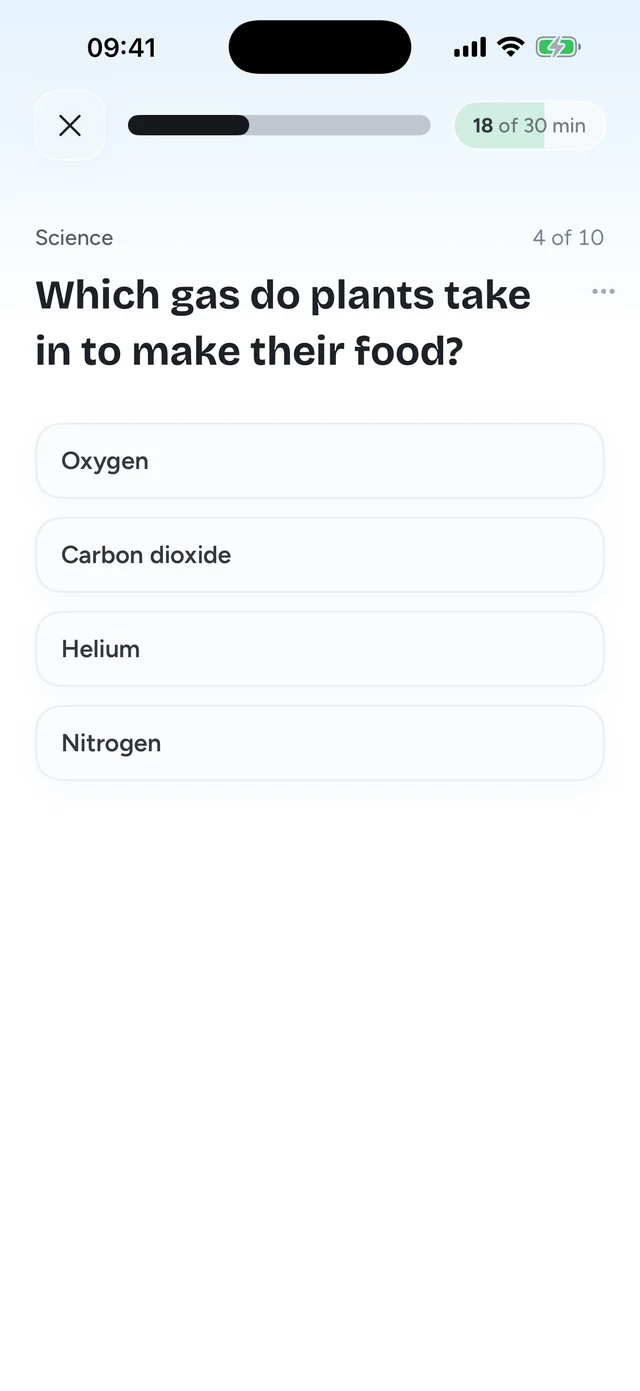
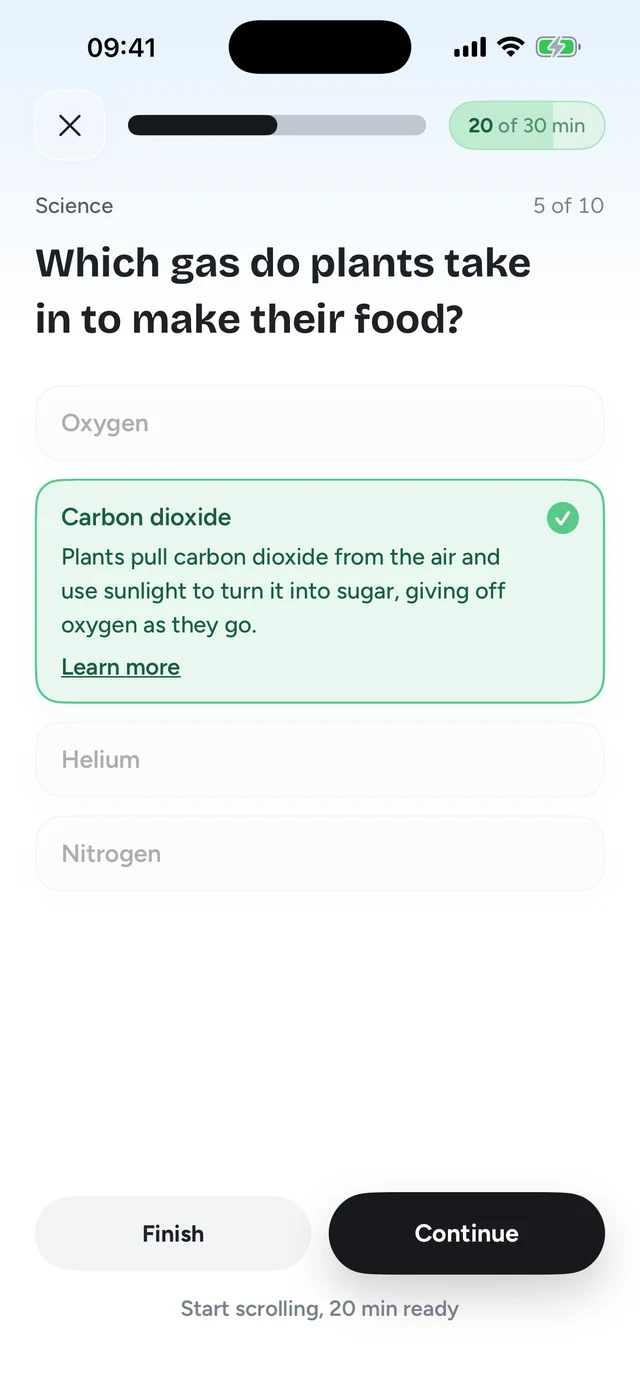
Why it's first: it's the only approach here where the friction pays you back. You still get to scroll, so there's no all or nothing mode to rage quit after a bad week. And every unlock leaves you knowing one more thing. It isn't impossible to get around (it runs on Screen Time, like the rest), but there's much less reason to try.
- Price: $69.99 a year with a 7-day free trial, or $12.99 a month.
- Platforms: iPhone only.
- Best for: people who keep tapping through limits, students, anyone who wants their scrolling to count for something.
- Not for: people who need a total lock for a few hours, or anyone on Android.
2. Opal
Opal is the best-known screen time app on the App Store, and it's polished. You set rules with schedules, time limits or open limits, and Opal blocks the apps. It also tracks an Opal Score. The free plan includes one rule. Pro adds unlimited rules and Hard Mode, which Opal describes as "no way out": you can't turn Opal off mid session.
- Price: free plan with one rule. Pro is $99.99 a year, $19.99 a month, or $399 lifetime.
- Platforms: iPhone, Android and Mac.
- Best for: planned deep work blocks, and anyone who needs a blocker across phone and Mac.
- Watch out for: Hard Mode is all or nothing, and it sits behind Pro.
Full comparison: Quizlock vs Opal.
3. one sec
one sec puts a short breathing pause in front of the apps you choose, then asks whether you still want to open them. On iPhone it hooks in through a Shortcuts automation. The idea is that a few seconds of friction is enough to catch you opening an app out of habit. The free version covers one app; Pro covers more, with prices that vary by region.
- Platforms: iPhone, Android and browser extensions.
- Best for: reflex opens, when you pick up the phone and the app is open before you've thought about it.
- Watch out for: a pause is easy to sit through once you're used to it, and setup takes a few steps in Shortcuts.
Full comparison: Quizlock vs one sec.
4. ScreenZen
ScreenZen is free, with no subscription. It's supported by donations. It shows a pause before a flagged app opens, asks about your intention, and lets you set daily limits and schedules. For a free app it covers a lot.
Full comparison: Quizlock vs ScreenZen.
- Price: free, donations welcome.
- Best for: anyone who wants a solid pause and limit tool without paying.
- Watch out for: like any pause, it relies on you choosing not to continue.
5. Brick
Brick is a small physical device. Tap your phone on it to block your chosen apps, tap again to unblock. Leave the Brick at home and the apps stay locked until you're back. You get five Emergency Unbricks for real emergencies, and Strict Mode stops you deleting the app to escape.
- Price: $59 one time for the device.
- Platforms: iPhone on iOS 18 or later, Android 12 or later.
- Best for: people who want the lock to live outside the phone entirely.
- Watch out for: it's binary. Apps are either blocked or open, with no way to have ten minutes. And it's one more thing to carry or lose.
Full comparison: Quizlock vs Brick.
6. Apple Screen Time
Screen Time is built into every iPhone and costs nothing. You can cap time per app or category (Time Allowances on iOS 27, App Limits on iOS 26) and make apps unavailable at certain hours (Screen Time Schedule on iOS 27, Downtime on iOS 26). Apple's own guide says that by default limits can be ignored once reached, so you'll want a Screen Time passcode that someone else picks.
- Price: free.
- Best for: a first try, and parents managing a child's device.
- Watch out for: the Ignore Limit button. See how to remove Ignore Limit.
Full comparison: Quizlock vs Screen Time.
Quizlock next to the paid blockers
| Feature | Quizlock | Opal | Brick |
|---|---|---|---|
| When you open a blocked app | Answer one question. Right answer, 2 minutes. | Block screen until the session ends | Blocked until you tap the device again |
| Partial use | Yes, earn as many minutes as you answer for, up to 30 at a time | Allowed by schedule or limit | No, on or off |
| Strict option | Unlocks must be earned | Hard Mode (Pro) | Strict Mode, five Emergency Unbricks |
| Learning | Your topics, PDFs, photos and links | None | None |
| Price | $69.99/year, 7-day free trial | $99.99/year Pro | $59 one time |
| Platforms | iPhone | iPhone, Android, Mac | iPhone, Android |
US prices as of October 2026, from Opal's pricing page and getbrick.com.
Best screen time apps
"Screen time app" covers two jobs. Some apps track your phone use and show you the numbers. Others step in when you open an app. Apple's Screen Time does the tracking well and for free, so most people don't need a separate tracker. The paid and free apps on this list earn their place by stepping in: Opal with schedules, one sec and ScreenZen with a pause, Brick with a physical key, and Quizlock with a question.
Apps to stop scrolling
- Quizlock if you want each scroll to cost one right answer.
- ScreenZen if you want a free pause before the feed.
- one sec if a breathing pause is enough to catch you.
- Opal if you want the feed shut during set hours.
- Brick if you want the off switch in another room.
How to choose
- Start with what failed
If you never tried anything, set up Screen Time with a passcode someone else holds. It's free and it tells you a lot.
- If you open apps on reflex
Try a pause: ScreenZen for free, or one sec.
- If you need hours of total focus
Opal's Hard Mode or Brick.
- If you get around every one of these
Change the deal. With Quizlock the unlock costs a right answer, and you learn something every time.
Step 3 of 3Answer right, earn scrolling time
Still deciding how to set things up? Our guide on how to block apps on iPhone walks through every built in option step by step. If you want fewer hours on the phone overall, start with how to reduce screen time.
What is the best app blocker for iPhone?
For most people who've already tried Screen Time and given up, Quizlock, because it makes you answer a question to earn time instead of putting up a wall you learn to skip. For hard focus blocks, Opal or Brick. For free, ScreenZen.
Is there a free app blocker for iPhone?
Yes. Apple's Screen Time is built in and free, and ScreenZen is free and donation supported. Opal and one sec have free tiers limited to one rule or one app.
What's the strictest app blocker for iPhone?
Opal's Hard Mode, which can't be turned off during a session, and Brick, which needs the physical device to unlock. Both are all or nothing.
Is Opal worth it?
If you want scheduled focus sessions across iPhone, Android and Mac, it's good. Pro is $99.99 a year. If blocks alone haven't worked for you, Quizlock costs $69.99 a year and asks a quiz question instead.
Do app blockers actually work?
They work when the friction either can't be skipped or isn't worth skipping. Walls you can tap through stop working once you're used to them. That's why Quizlock makes the gate a question with a payoff.