ScreenZen is one of the most liked screen time apps around, and it's easy to see why. It's free. There's no subscription. It's paid for by donations from people who want it to keep going. And it works for a lot of them: the site says over 500,000 people use it every month.
We make Quizlock, so we're not neutral. But this isn't a page about why ScreenZen is bad, because it isn't. It's about two ways of solving the same problem, and which one fits you.
What ScreenZen does
You choose the apps and websites you want to cut back on. When you open one, ScreenZen puts a pause in the way. You wait a few seconds and see a prompt, which you can write yourself, like "what are you looking for?". Then you decide whether to carry on. On top of that you can set daily limits, schedule blocks for focus time, and limit how many unlocks you get each day.
Its FAQ says there's a lock mode that protects against common loopholes, including uninstalling the app. ScreenZen runs on iOS, macOS, Windows and Android, and it now sells a companion device called halo that you put in your bedroom or on your desk.
The short version
| Feature | Quizlock | ScreenZen |
|---|---|---|
| When you open a limited app | Answer one quiz question. Right answer, 2 minutes. | Wait through a pause and a prompt, then choose to continue |
| What the pause gives you | A fact or a word on a topic you picked | A moment to rethink |
| Limits and schedules | Minutes are earned, up to 30 in the wallet | Daily limits, schedules, unlock limits |
| Learning | Any topic you type, plus quizzes from your PDFs, photos and links | None |
| Price | $69.99 a year or $12.99 a month, 7-day free trial | Free, donations welcome |
| Platforms | iPhone | iOS, macOS, Windows, Android |
ScreenZen details are from screenzen.co as of October 2026.
Why a pause works, and when it stops
A pause works because most app opens aren't decisions. Your thumb gets there before you've thought about it. A few seconds of waiting gives your brain a chance to catch up and ask if you meant to do this. One ScreenZen reviewer on its site says the pause "annoyed me just enough" that they stopped opening apps unless they were taking a real break. That's the whole idea working.
The weak spot is that waiting doesn't need your attention. You can sit through a pause while still half asleep. After a few weeks, plenty of people stop reading the prompt and just wait for the button. The pause turns into part of the loading screen.
- Open Instagram
- Pause and a prompt appear
- Wait it out
- Tap continue and scroll
Great at first. Easy to wait through on autopilot later.
 Quizlock
- Open Instagram
- Quizlock asks one question
- Think, answer, earn 2 minutes
- Scroll, one fact richer
You can't answer on autopilot, and the pause pays you back.
A ScreenZen user asked for this
One of the reviews on ScreenZen's own homepage asks for something very close to Quizlock. The reviewer says they'd love "a quiz pause alternative where you can maybe upload a text or csv file with notes and flashcard information". They're learning Korean and want to "review 10 vocab words correctly before unlocking the app".
That's a fair summary of the difference between the two apps. ScreenZen asks you to stop and think. Quizlock asks you to stop and think about something specific, something you wanted to learn anyway.
How Quizlock works
Quizlock locks the apps you choose through Apple's Screen Time system. When you open one, you get a quiz question on a topic you picked. Answer right and you earn 2 minutes. Your minutes collect in a wallet that holds up to 30, so a short run of right answers buys a proper break. When the minutes run out, the apps lock again.
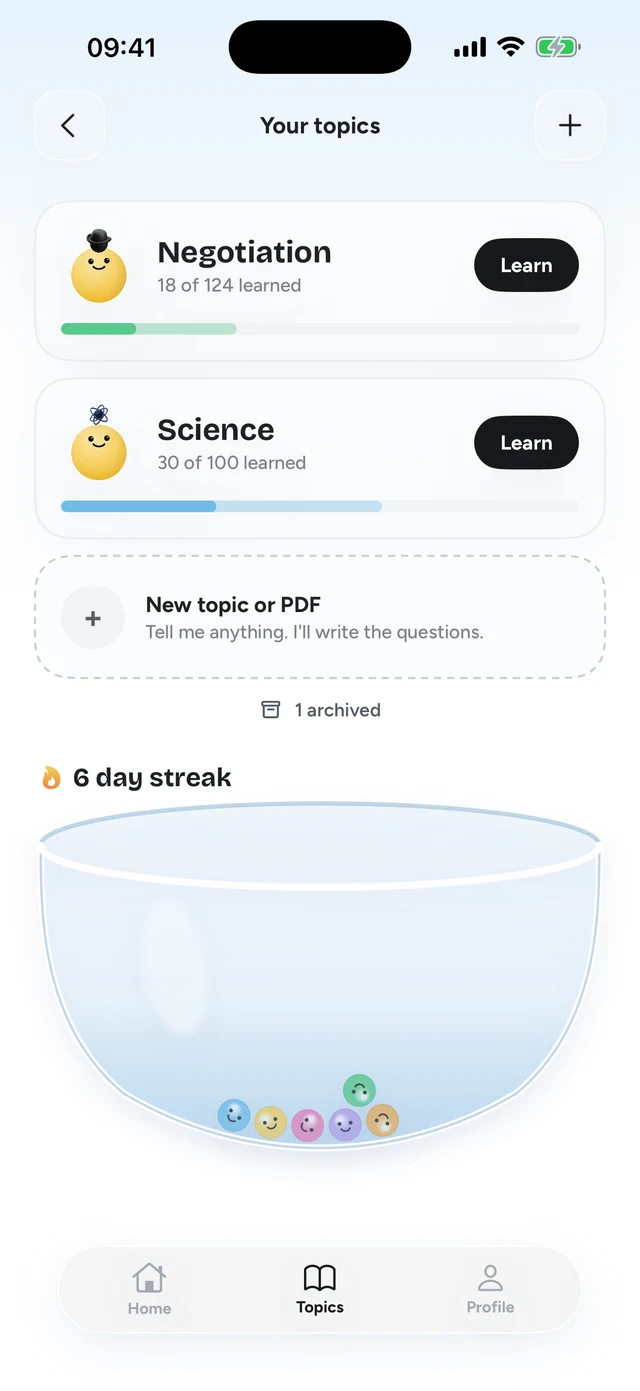

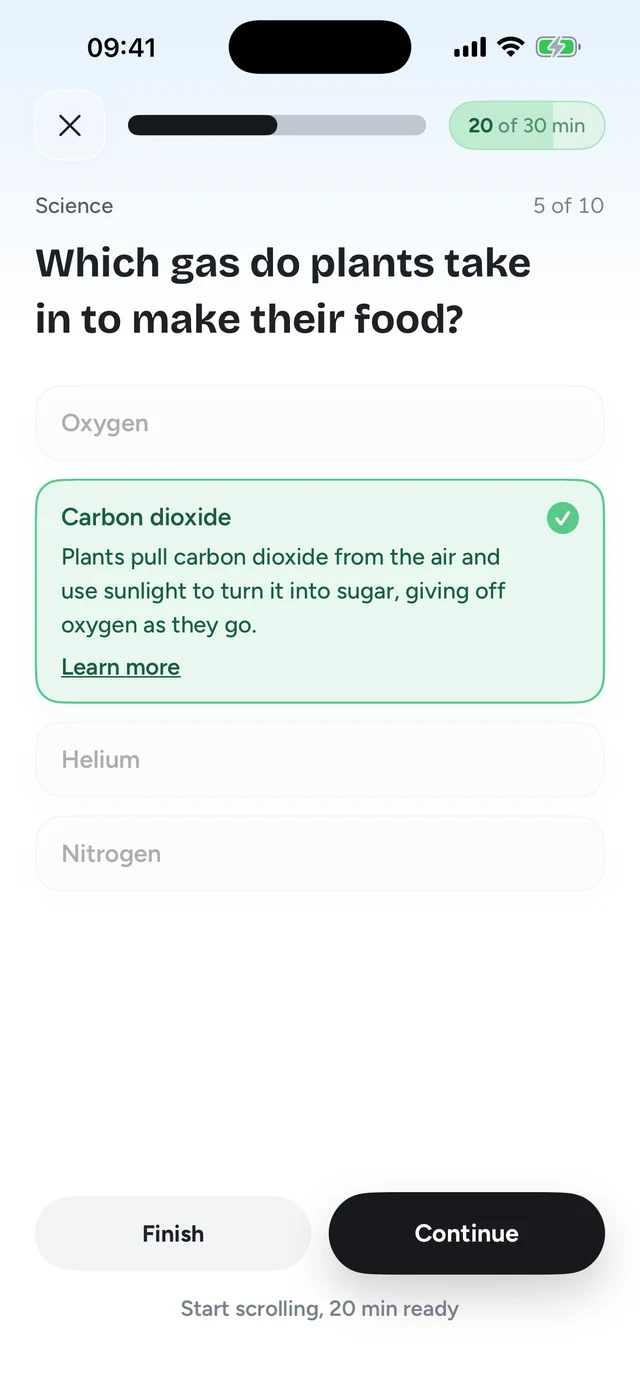
Topics can be anything you type: Korean, the periodic table, art history. You can also make quizzes from your own material. Upload a PDF, take a photo of your notes or paste a web link, and the questions come from that. So the Korean learner above could put their vocab in front of TikTok.
It isn't unbreakable. It runs on Screen Time, like every iPhone blocker. But the gate gives you something, so there's less reason to look for a way around it.
Price: free vs paid
ScreenZen wins on price, plainly. It's free, and you can donate if you want to support it. Quizlock is $69.99 a year or $12.99 a month after a 7-day free trial. What the money pays for is the learning: the questions, the topics you type in, and the quizzes made from your own files.
Which one to try first
If you've never used a screen time app, start with ScreenZen. It costs nothing, and a week with it tells you a lot about your habits: which apps you open most, and whether a few seconds of waiting is enough to change your mind.
- Week one: try the pause
Install ScreenZen, add your two worst apps, and write a prompt that makes you think, like "what are you looking for?".
- Check how you respond
If you close the app after the pause most of the time, you've found your tool. Keep it.
- If you wait through it
That's the sign a pause has stopped working for you. Try Quizlock's 7-day free trial on the same two apps and see whether a question holds where a timer didn't.
Either way, don't lock everything. Two or three apps where the hours go is enough, and it keeps maps, messages and work apps out of the way.
Where ScreenZen is the better pick
- You don't want to pay anything. ScreenZen is free.
- You need it on Android, Mac or Windows. Quizlock is iPhone only.
- You want detailed limits, schedules and open counts more than you want to learn something.
- A pause already works for you. If it does, keep it.
Pick Quizlock if you've learned to wait through the pause
ScreenZen is a generous, well made free app, and if its pause still stops you, there's no reason to switch. If you've started waiting through it without thinking, Quizlock asks for a right answer instead, and each one is a step forward on something you chose.
- A question needs your attention, a timer doesn't
- Learn any topic, or quiz yourself on your own notes and PDFs
- Earned minutes, up to 30 at a time, then the apps lock again
Is ScreenZen free?
Yes. ScreenZen's site says it's completely free with no subscription, and you can support it with a donation if you'd like.
What is the ScreenZen app?
A screen time app that puts a pause and a prompt in front of apps and websites you choose. It also has daily limits, scheduled blocks and a lock mode. It runs on iOS, macOS, Windows and Android.
Is there a ScreenZen alternative that helps you learn?
Quizlock. Instead of a waiting screen, it asks a quiz question on a topic you picked. A right answer earns 2 minutes. You can also make quizzes from your PDFs, photos of notes and links.
Can I use ScreenZen and Quizlock together?
You could, but most people only need one gate per app. You might keep ScreenZen on a Mac and use Quizlock on your iPhone.
Does Quizlock work on Android?
Not yet. Quizlock is an iPhone app.