The Opal app is the best-known screen time app on the App Store, and it earns that. It looks good, the schedules are flexible, and the focus score is a nice touch. If you have tried it and still ended up on TikTok at 1 am, though, you are not alone, and the reason is built into how app blockers work.
This page compares the two on what matters: what happens when you reach for a blocked app, what it costs, and whether it still works after the first month.
The short version
| Feature | Quizlock | Opal |
|---|---|---|
| When you open a blocked app | Answer one question on a topic you picked. Right answer, 2 minutes of scrolling. | A block screen. Wait it out, or end the session. |
| What you get from the pause | A fact, a word or a formula you actually keep | Nothing. The time is just gone. |
| Stops you from cheating | Unlocks have to be earned, one right answer at a time | Hard Mode, Pro only |
| Learning | Your own topics, plus quizzes made from your PDFs, photos and links | None |
| Yearly price | $69.99, 7-day free trial | $99.99 (Pro), or $399 lifetime |
| Monthly price | $12.99 | $19.99 |
| Platforms | iPhone | iPhone, Android, Mac |
Prices are US list prices as of October 2026, from Opal's pricing page and the App Store. Regional prices vary.
Opal app review
Opal blocks the apps you pick using rules: a schedule, a time limit, or a cap on how many times you open something. It tracks an Opal Score for your day and runs on iPhone, Android and Mac. Here's how it stacks up after the first week, based on what Opal lists on its own pricing page.
What's good
- It's polished and quick to set up.
- Rules are flexible. Schedules, time limits and open limits cover most routines.
- The free plan is real. One rule with basic blocking is enough to find out if blocking helps you.
- It works across iPhone, Android and Mac, which few blockers do.
- Hard Mode is a genuine lock for people who want one.
What's not
- Hard Mode and unlimited rules need Pro, and Pro is $99.99 a year.
- The free plan stops at one rule.
- The block screen gives you nothing back for waiting, so it's easy to start resenting it.
- Hard Mode is all or nothing. People who need their phone for one quick thing tend to switch it off.
Our take: Opal is a good blocker. If blocking is what you need, it's one of the best. If you've tried blockers and keep finding your way around them, read on.
Why blocking alone stops working
Every blocker runs on the same idea: put friction between you and the app, and you will open it less. It works for a week or two. Then your thumb learns the new route. You see the block screen, you tap through or end the session, and you are back in the feed. Screen time researchers call this habituation. You stop noticing a barrier you hit fifty times a day.
Opal's answer is Hard Mode, where you can't turn Opal off at all. That fixes the bypass, but it turns your phone into a brick until the timer ends, which is why so many people switch it off after a bad week and never turn it back on. All or nothing tends to end at nothing.
- Reach for Instagram
- Block screen appears
- End the session, or wait
- Scroll anyway, a little guilty
The friction is pure cost, so you learn to skip it.
 Quizlock
- Reach for Instagram
- Quizlock asks one question
- Answer it right, get 2 minutes
- Scroll, and you learned something first
The friction pays you back, so there is nothing to skip.
How Quizlock works instead
Quizlock uses the same Apple Screen Time system Opal uses to shield your apps. The difference is what stands at the gate. Instead of a block screen, you get one question on something you chose to learn: Spanish verbs, world history, the biology chapter you have an exam on. Answer it right and you earn 2 minutes. Your minutes sit in a wallet that holds up to 30, so a few good answers buy you a proper break.
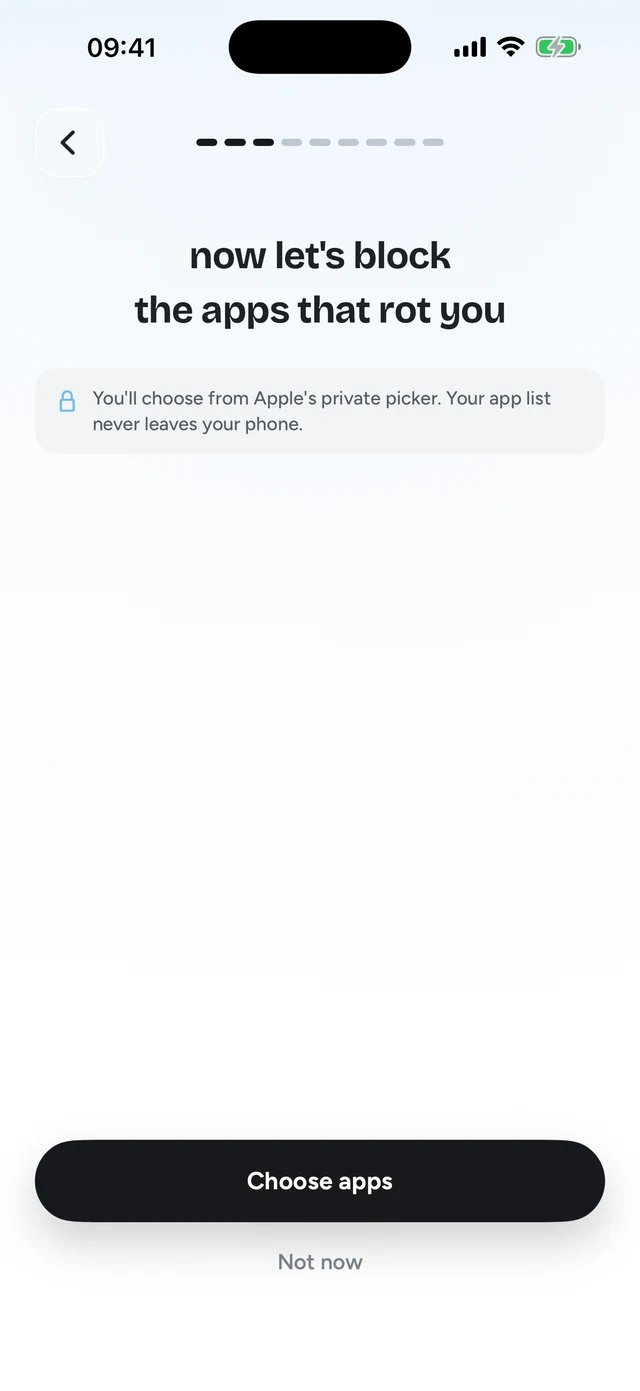
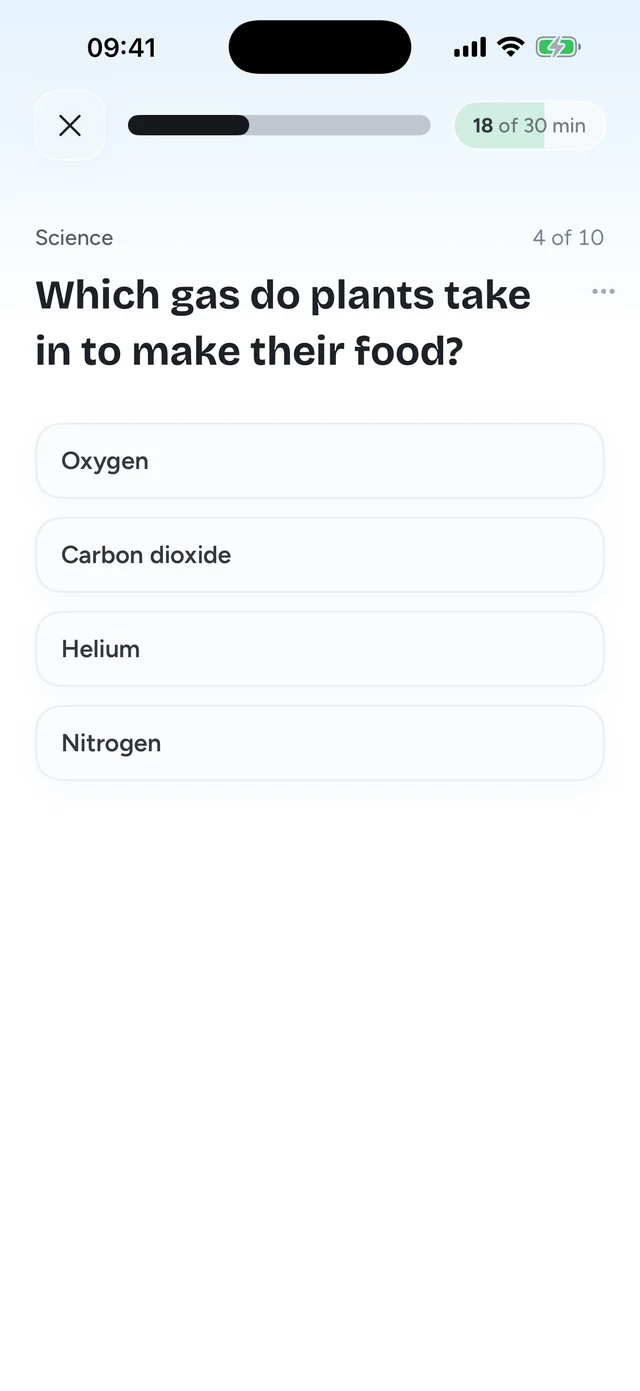
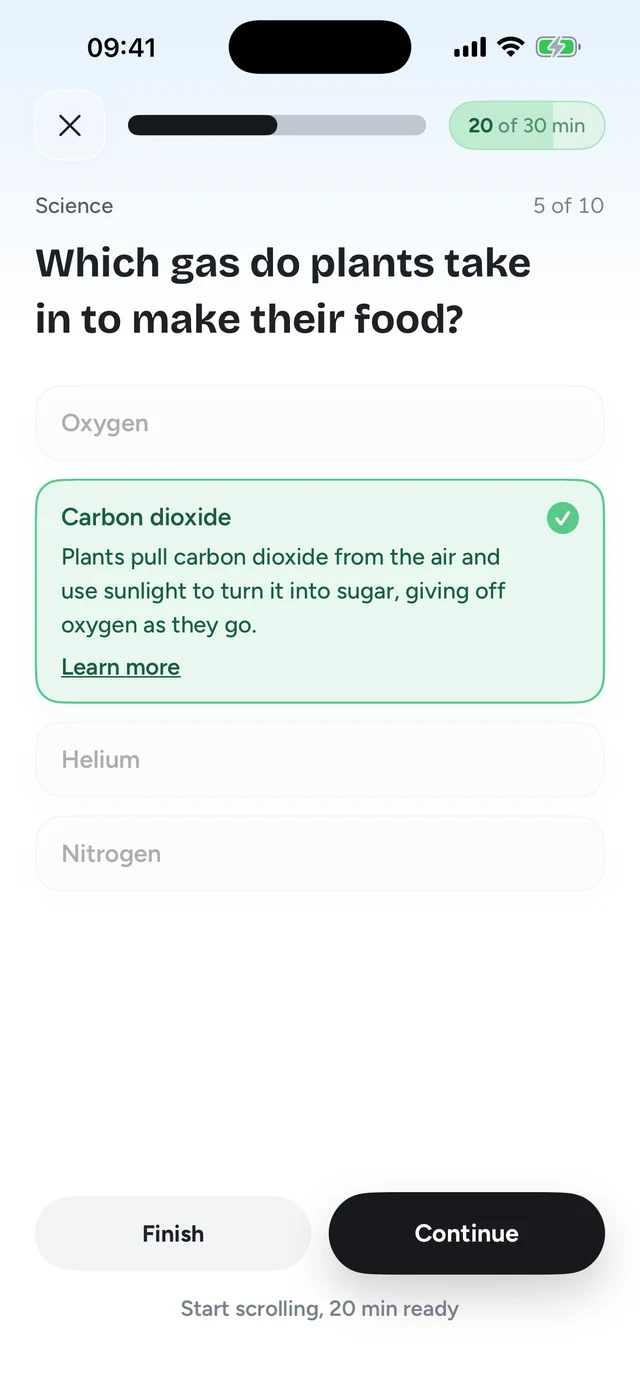
Because every unlock asks something of your brain, opening TikTok on autopilot stops being free. You still can, nobody is locking you out of your own phone. You just have to be awake for it. And the scrolling you do keep comes with a few hundred facts attached by the end of the month.
Price: Quizlock costs $30 less a year
Opal has a free tier with one rule and basic blocking, and that is a fair place to start. The features that make a blocker hold, like strict mode and unlimited rules, sit behind Pro. Quizlock is one plan with everything in it, and it is cheaper than Opal Pro on both yearly and monthly billing.
Where Opal is the better pick
We would rather you pick the right app than the wrong one. Opal is the better choice if:
- You need it on Android or a Mac. Quizlock is iPhone only for now.
- You want a hard lock for deep work, where nothing gets through for three hours. Opal's Hard Mode is built for that.
- You don't want to learn anything, you just want less phone. A plain blocker is simpler.
Pick Quizlock if the blocker keeps losing
If you have used Opal, Screen Time or one sec and keep finding your way around them, the problem isn't the settings. It is that the block gives you nothing back. Quizlock turns the urge to scroll into a question you can win.
- Every unlock teaches you something on a topic you picked
- No all-or-nothing modes to give up on after a bad week
- $69.99 a year with a 7-day free trial, against $99.99 for Opal Pro
What is the Opal app?
Opal is a screen time app for iPhone, Android and Mac. It blocks the apps you choose with schedules, time limits or open limits, and it keeps an Opal Score of your focus. Pro adds Hard Mode, where you can't turn Opal off mid session.
Is Opal free?
Opal has a free plan with one rule, basic blocking and today's Opal Score. Hard Mode, unlimited rules and score history need Opal Pro.
How much is Opal?
Opal Pro is $99.99 a year, $19.99 a month, or $399 for lifetime access, per opal.so/pricing as of October 2026. Prices can differ by region.
Is Quizlock a good Opal alternative?
Yes, if you are on iPhone and the blocker approach hasn't stuck for you. Quizlock locks the same apps, but you unlock them by answering quiz questions instead of waiting out a timer.
Can I use Quizlock and Opal together?
You can, they both use Apple's Screen Time system. Most people find one gate is enough, and Quizlock's is the one they don't turn off.
Is Quizlock cheaper than Opal?
Yes. Quizlock is $69.99 a year or $12.99 a month. Opal Pro is $99.99 a year or $19.99 a month, as of October 2026.
What can I learn with Quizlock?
Anything you type in as a topic, from Spanish to stoic philosophy. You can also make quizzes from your own PDFs, photos of notes and web links.
Does Quizlock work on Android?
Not yet. Quizlock is an iPhone app.