one sec is one of the smartest app blockers out there. It doesn't block anything. When you open an app you flagged, it makes you take a slow breath first, then asks if you still want to go in. The idea is that most app opens are muscle memory, and a few seconds of pause is enough to break the reflex. It has real research behind it, which most apps in this category can't say.
So why look for a one sec alternative? Usually because the pause stopped working. You open TikTok, the breathing screen comes up, and your thumb taps through it before your brain has noticed. This page is about why that happens and what Quizlock does differently.
The short version
| Feature | Quizlock | one sec |
|---|---|---|
| When you open a locked app | Answer one question on a topic you picked. Right answer, 2 minutes. | A breathing exercise, then you choose whether to continue |
| What you get from the pause | A word, a date or a formula you get to keep | A moment to notice what you're doing |
| Learning | Any topic you type, plus quizzes from your PDFs, photos of notes and links | None |
| Free version | 7-day free trial | Yes, for one app |
| Paid plans | $69.99 a year or $12.99 a month | 3,99 € a month, 14,99 € a year, or 99,99 € lifetime |
| Platforms | iPhone | iPhone, Android, browser extension |
one sec prices are from the one sec FAQ, listed in euros, as of October 2026. one sec says prices differ by region. Quizlock prices are US list prices.
Why a breathing pause wears off
Friction works by making the bad habit a little more expensive. The catch is that your brain is very good at learning to ignore a cost it pays fifty times a day. The first week, the breathing screen feels like a tap on the shoulder. By week six it is a loading screen. You wait it out, or you skip it, and the feed is right there.
That isn't a flaw in one sec specifically. Every pause, timer and block screen has the same problem: it costs you something and gives nothing back. A cost with no payoff is the exact thing people learn to route around.
- Reach for Instagram
- Breathing screen appears
- Wait it out, tap continue
- Scroll, same as before
The pause is pure cost, so over time you stop noticing it.
 Quizlock
- Reach for Instagram
- Quizlock asks one question
- Answer it right, earn 2 minutes
- Scroll, one fact richer
The pause pays you back, so it is worth sitting through.
What one sec gets right
Credit where it's due. one sec is one of the few screen time apps with a peer-reviewed study behind it: Grüning, Riedel and Lorenz-Spreen, published in PNAS in 2023. On its homepage, one sec reports this:
Fewer openings is a real result. But opening an app less often doesn't change what happens once you're in. And the pause itself is empty time. Quizlock is betting that the same few seconds can teach you something instead.
How Quizlock uses the pause instead
Quizlock shields your apps through Apple's Screen Time system. When you open one, you get a quiz question on something you chose: Spanish verbs, anatomy, the history unit you have a test on next week. Get it right and you earn 2 minutes. Minutes collect in a wallet that holds up to 30, so a short run of right answers buys a proper break.
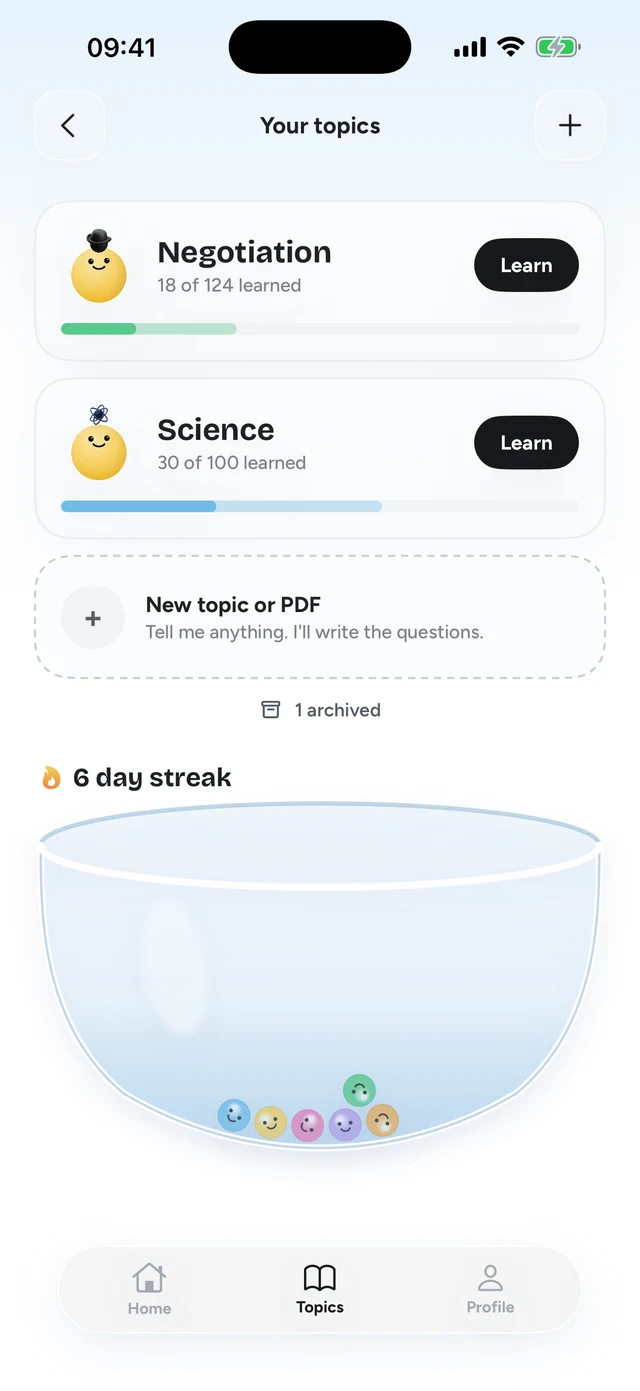
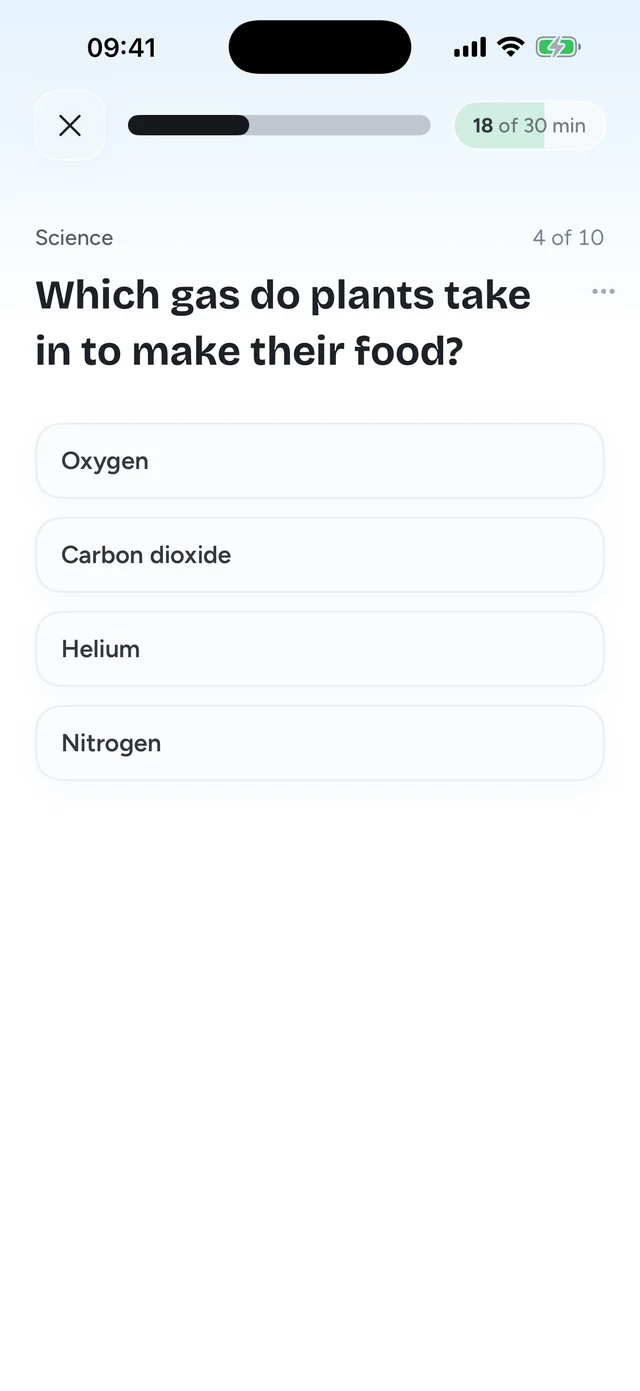
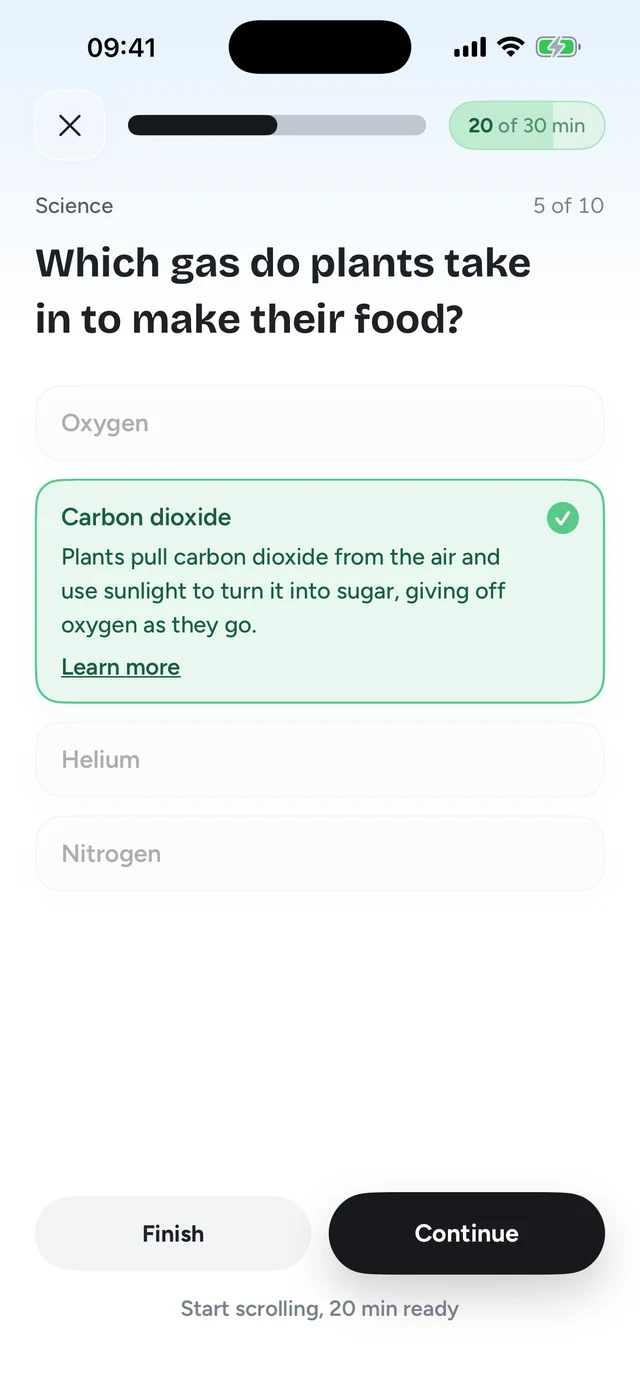
The question does the same job as one sec's breath. It interrupts autopilot. The difference is that you can't tap through a question you don't know the answer to, and when you do know it, you walk away with something. A month of reflexive Instagram opens turns into a few hundred questions answered on a subject you care about.
You can also feed it your own material. Upload a PDF, snap a photo of your notes, or paste a link, and Quizlock builds questions from it. That makes it useful for exam season in a way a breathing timer can't be.
Price: one sec is much cheaper
There is no way around this one. one sec Pro is 14,99 € a year in the regions its FAQ lists, and the free version covers one app. Quizlock is $69.99 a year after a 7-day free trial, or $12.99 a month. If the breathing pause still works for you, one sec is the better deal and you should keep it.
What the extra money buys is questions written for your topic or your own notes. Whether that's worth it comes down to whether you want your pauses to teach you something.
Where one sec is the better pick
- You use Android or a computer. one sec runs on iPhone, Android and as a browser extension. Quizlock is iPhone only.
- The pause still works for you. If you see the breathing screen and actually close the app, don't fix what isn't broken.
- You want the cheapest option with research behind it. one sec's free tier and yearly plan cost far less than Quizlock.
- You want to block websites, not just apps. one sec's browser extension covers that.
Pick Quizlock once the pause has gone invisible
If you have used one sec long enough that the breathing screen feels like a loading screen, the mechanism has worn off. Quizlock keeps the interruption and swaps the empty pause for a question you have to actually think about.
- You can't tap through a question you don't know
- Every unlock teaches you something on a topic you picked
- Works with your own PDFs, notes and links, not just preset topics
What is a good one sec alternative for iPhone?
If the breathing pause has stopped working for you, Quizlock keeps the interruption but replaces it with a quiz question. A right answer earns 2 minutes of scrolling.
Does one sec actually work?
one sec has a peer-reviewed study published in PNAS in 2023 and reports 57% fewer app openings on average. The weak spot of any pause is that tapping through it can turn into its own habit.
How much does one sec cost?
one sec's FAQ lists Pro at 3,99 € a month, 14,99 € a year or 99,99 € lifetime, with prices varying by region. The free version covers one app.
Can I use one sec and Quizlock together?
You can, but stacking two interruptions on the same app gets annoying fast. Pick one gate per app.
Is Quizlock on Android?
No. Quizlock is iPhone only for now.