Screen Time is built into every iPhone and it's free. You can see where your hours go, set Downtime, and put a daily App Limit on Instagram or TikTok. For a lot of people that is the first thing they try, and for some it's enough.
If you're here, it probably wasn't. You set a one-hour limit on TikTok, hit it at 9 pm, and tapped Ignore Limit without a second thought. This page explains why that happens, what Apple gives you to stop it, and how Quizlock uses the same Screen Time system in a different way.
The short version
| Feature | Quizlock | iOS Screen Time |
|---|---|---|
| When you hit the limit | Answer a quiz question. Right answer, 2 more minutes. | A limit screen with Ignore Limit right on it |
| Getting past it | Earn it, one right answer at a time | One More Minute, Remind Me in 15 Minutes, or Ignore Limit For Today |
| Making it strict | Every unlock costs a right answer by default | Turn on Block at End of Limit and hand the Screen Time passcode to someone else |
| What you get from the pause | A fact, a word or a formula on a topic you chose | Nothing |
| Price | $69.99 a year or $12.99 a month, 7-day free trial | Free, built into iOS |
| Learning | Any topic, plus quizzes from your PDFs, photos and links | None |
Screen Time options as described in Apple's Screen Time support documentation, as of October 2026.
Why App Limits turn into suggestions
When an App Limit runs out, Screen Time doesn't really lock the app. It shows a screen that says you've reached your limit, with a way past it built in. Tap Ignore Limit and you can pick one more minute, a reminder in 15 minutes, or ignore it for the rest of the day.
The first few times, that screen makes you stop and think. After a couple of weeks, you're not reading it. Your thumb knows that Ignore Limit then Ignore Limit For Today is two taps, and it does them faster than you can decide not to. A limit you can dismiss in two taps is a suggestion, and your habits learn that quickly.
- Hit your TikTok limit
- Limit screen appears
- Ignore Limit, then Ignore Limit For Today
- Scroll for the rest of the night
Two taps cost nothing, so the limit stops meaning anything.
 Quizlock
- Open TikTok
- Quizlock asks one question
- Answer it right, earn 2 minutes
- Time's up, answer another to keep going
Every extra stretch costs a right answer, so there's no free skip.
The free fix, and why most people don't use it
Apple does give you a way to make limits stick. Set a Screen Time passcode, then turn on Block at End of Limit for the App Limit. Now the only way past the limit is the passcode. If someone else sets that passcode and keeps it, you really are locked out.
- Set a Screen Time passcode
In Settings, open Screen Time and choose Lock Screen Time Settings.
- Turn on Block at End of Limit
Open the App Limit you made and switch it on. The Ignore Limit option goes away.
- Give the passcode to someone else
If you know it, you'll type it at 11 pm. A partner, roommate or friend has to hold it.
This works, and it's free. The catch is that it depends on another person. You have to ask them every time you need Instagram for something real, and if you set the passcode yourself, you're back to two taps, just with four digits in the middle. It's built for parents managing a kid's phone more than adults managing their own.
How Quizlock uses the same system differently
Quizlock runs on Apple's Screen Time API, the same system that powers App Limits. The difference is what happens at the gate. Instead of Ignore Limit, you get one question on something you chose to learn. A right answer earns 2 minutes. Minutes go into a wallet that holds up to 30, so you can save up for a longer break.
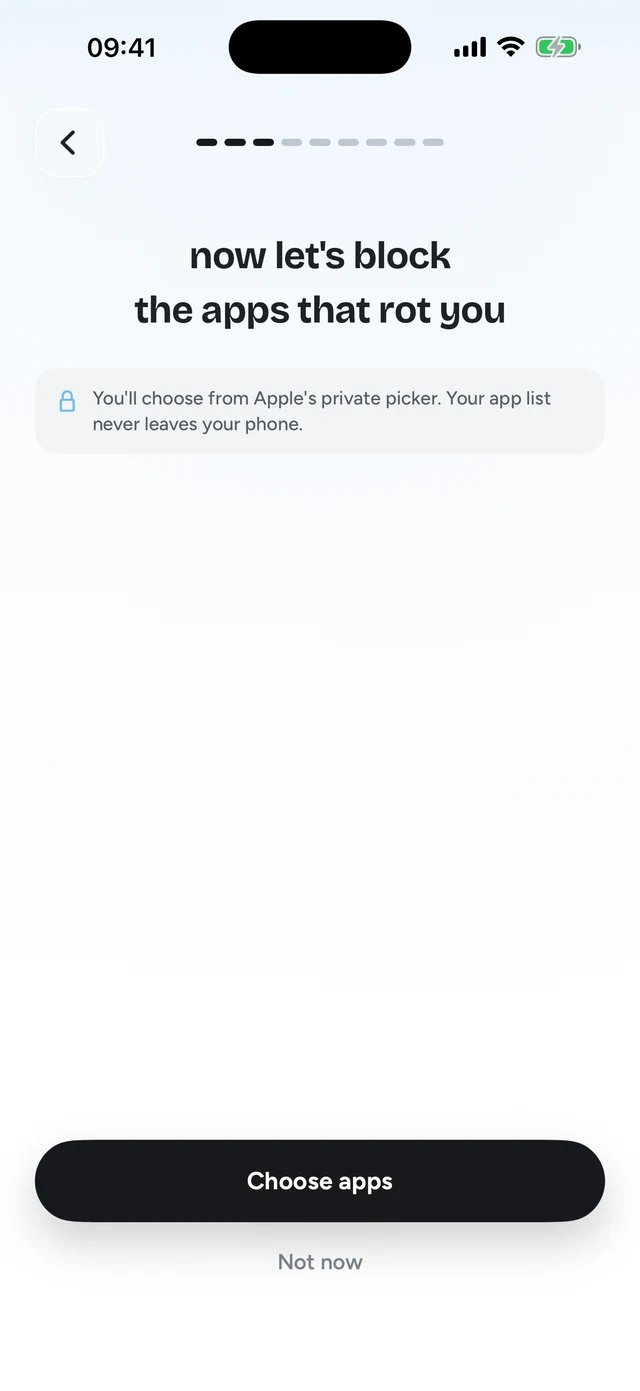
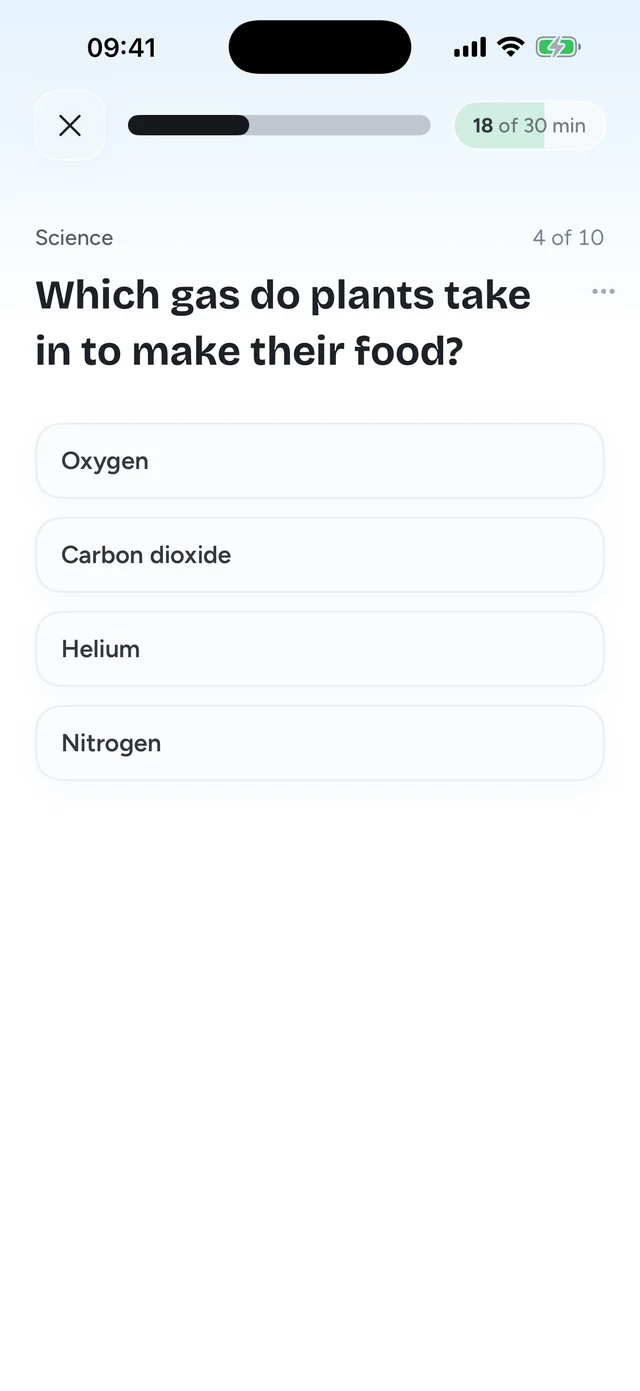
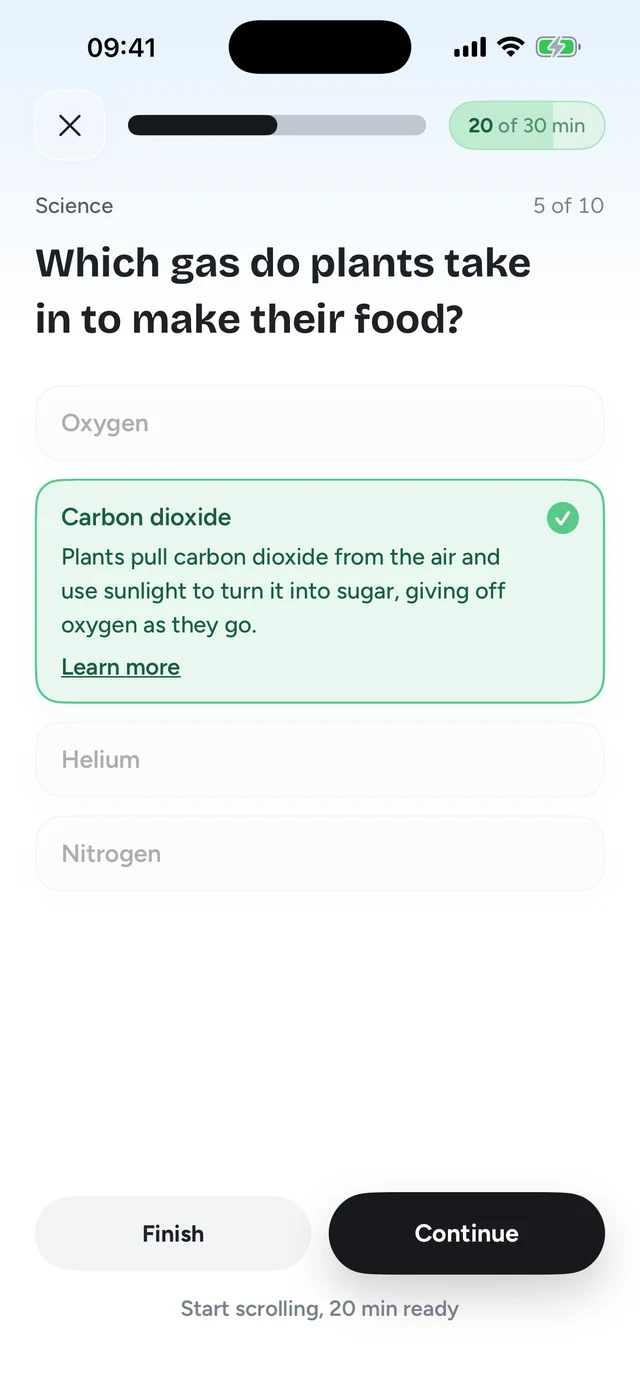
Nobody else has to hold a passcode. You can still get into your apps whenever you want, but only by doing something that takes a bit of attention. That small cost is what makes autopilot opens rarer. And since the cost is a question on a topic you picked, a month of it adds up to something you actually learned.
Quizlock is not impossible to get around. It runs inside Apple's rules, and you can turn it off in Settings like any Screen Time app. What it changes is the default. The easy path stops being a free tap and becomes a question.
Free vs $69.99
Screen Time costs nothing. Quizlock is $69.99 a year after a 7-day free trial, or $12.99 a month. That's a real difference, and if Screen Time is holding for you, keep using it. Quizlock is for when it isn't, when you've tapped Ignore Limit enough times that you don't see the screen anymore.
Think of the price as two things in one. You get a limit that asks something of you every time, without needing someone else to guard a passcode. And you get a study tool for any topic you type, or for your own PDFs, photos of notes and web links.
Where Screen Time is the better pick
- You want to see your usage and that's enough to change it. Screen Time's weekly report does that for free.
- You can hand the passcode to someone you trust. With Block at End of Limit, Screen Time is stricter than Quizlock.
- You're managing a child's phone through Family Sharing. Screen Time is built for that.
- You don't want to pay anything. Screen Time is free.
Pick Quizlock when Ignore Limit keeps winning
Screen Time gives you good data and a limit that's easy to dismiss. Quizlock uses the same Apple system but swaps the dismiss button for a question, so going past your limit takes a moment of thought and teaches you something on the way.
- No Ignore Limit button: every unlock costs a right answer
- No passcode holder needed
- Learn a topic you chose in the time you'd have scrolled
How do I stop tapping Ignore Limit on Screen Time?
Set a Screen Time passcode and turn on Block at End of Limit, then give the passcode to someone else. Or use an app like Quizlock, which replaces the skip with a quiz question you have to answer right.
What is a good Screen Time alternative for iPhone?
Quizlock uses the same Apple Screen Time system but makes every unlock cost a right answer on a topic you chose. Each right answer earns 2 minutes.
Why are my Screen Time limits not working?
Often they are working, but Ignore Limit lets you skip them in two taps. Without Block at End of Limit and a passcode you don't know, the limit is easy to dismiss.
Is Quizlock worth paying for if Screen Time is free?
Only if Screen Time isn't holding for you. Quizlock is $69.99 a year with a 7-day free trial, so you can find out before paying.
Does Quizlock use Apple's Screen Time?
Yes. Quizlock locks apps through Apple's Screen Time API, the same system behind App Limits.